Part III: BCD Modification

Summary
In the previous blog posts we saw how available COM interfaces and methods could be used to modify registry and volume shadow copies on the host. Today following the tradition we will see how BCDStore WMI interface could be used to update Boot Configuration Data store settings. And just like in the other posts we will take a look at the runtime behavior for this PoC and see why it might be challenging for EDR to detect this kind of stuff.
BCD Primer
BCD stands for Boot Configuration Data store - it is a file containing boot entries read by the Windows Boot Manager (bootmgfw.efi) on system startup. This file internally is a registry hive, usually mapped under HKLM\BCD00000000 registry key once the system is fully started. Each BCD object is identified by a GUID, which names a subkey under Objects key. Each GUID has Description and Elements subkeys. Each BCD Elements is its own subkey - the subkey name is the hex representation of a DWORD that bcdedit refers to as a datatype.
For this post we will target the fverecoverymessage element - the BitLocker recovery message shown to users who forget their PIN or password if the recovery option was set up for the host. It lives under GUID {9dea862c-5cdd-4e70-acc1-f32b344d4795} (Windows Boot Manager) in Elements subkey 220000041, which breaks down to class:application, format:string, and element ID 0x41. You can verify this datatype mapping using MSDN docs as well.
Common Update Mechanisms
The BCD store is a frequent target for threat actors since it holds settings that can be abused to bypass EDR defenses. For example, bootstatuspolicy and recovery enabled are commonly modified to inhibit system recovery. But the interesting part for us here is not what gets targeted but how.
The standard approach is bcdedit.exe - a native Windows utility that takes command-line arguments to modify BCD entries. It is quite straightforward to detect using process command-line based detections. But there is also the BCDStore WMI interface, which avoids spawning easily trackable bcdedit.exe. We will use fverecoverymessage as our target element - why this specific element was chosen will be discussed in the following blog posts.
So how do we modify this BCD object? Well according to the MSDN documentation we will need two WMI methods. BCDStore::OpenObject to get an instance of BCDObject for a given GUID, and BCDObject:SetStringElement to write a new string value to a specified element type. Of course, we will need admin rights for the WMI call not to fail.
boolean OpenObject(
  [in]  string    Id, // {9dea862c-5cdd-4e70-acc1-f32b344d4795}
  [out] BcdObject Object
);

boolean SetStringElement(
  [in] uint32 Type, // 0x22000041
  [in] string String // new recovery message
);
The full PoC code can be found here.
Runtime Behavior
Now let's take a look at what actually happens during the execution. The burning question is does our binary writes to the BCD registry key directly, or does something else do it?
The MSDN documentation references Bcd.mof - the managed object format file describing the WMI interface, methods, and providers. Inside this file there is a single CLSID: {f8a56d3e-e304-4a9f-a916-5187019d7759}. Looking this up in the registry shows the in-process COM server bcdprov.dll where the code for this interface lives.
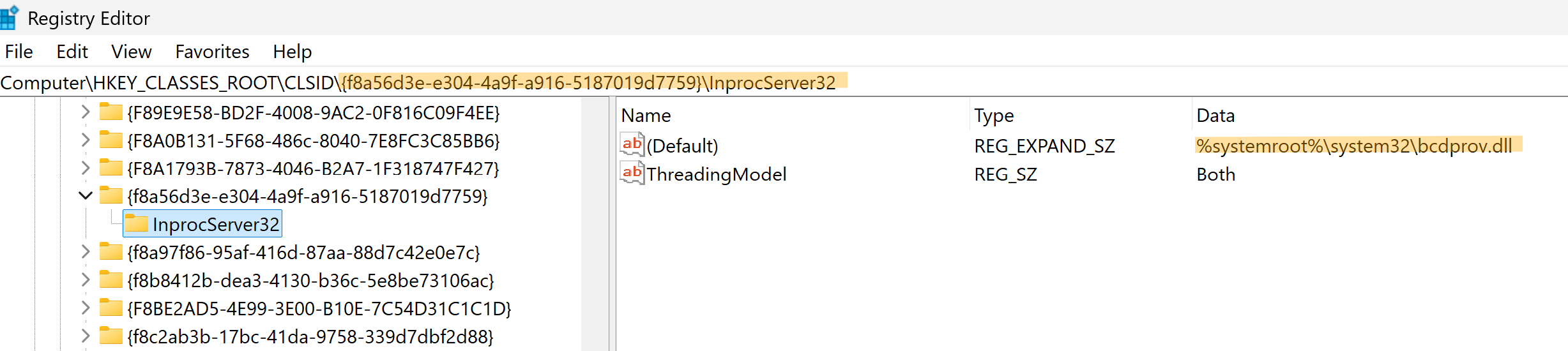
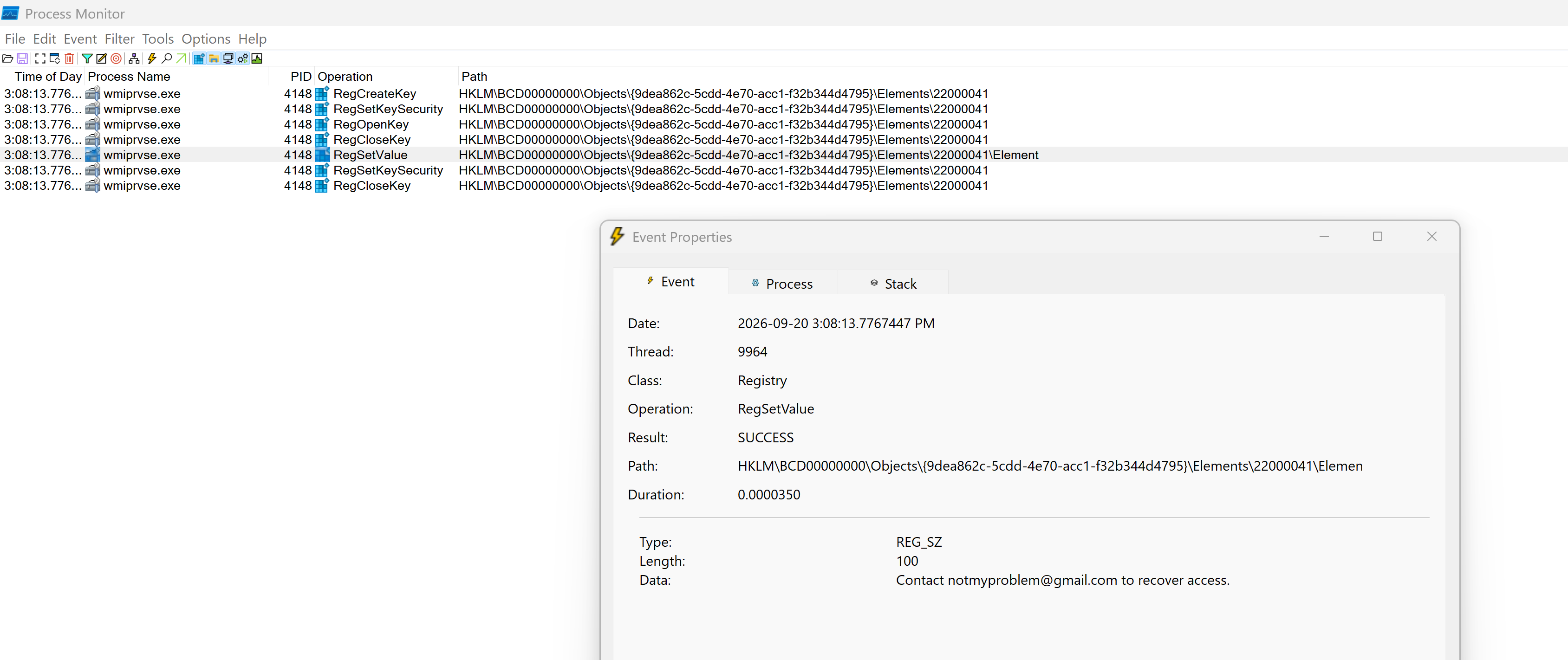
Since we already covered how WMI operates under the hood in the first blog of these series - we already know that the WMI Provider hosting process wmiprvse.exe will load the COM server and update the BCD setting on our behalf. Let's compile the PoC, launch Sysinternals Process Monitor, run the PoC and confirm. And indeed the screenshot below shows that BCD00000000 registry key was updated by wmiprvse.exe , and not by our binary.
Conclusion
You could monitor all registry write operations to BCD00000000 subkeys, and in theory that covers both the bcdedit.exe and WMI paths. In reality, once the host is encrypted with BitLocker and the recovery message is set there is really no legitimate reason to update it again or delete it. The same applies to the majority of other BCD settings - they are configured and then we leave them alone.
The interesting problem here is the attribution. When the BCDStore WMI interface is used, the registry modification is performed by wmiprvse.exe - a legit, high-reputation Windows process - not from the binary that actually requested the modification. EDR usually will whitelist or won't alert on registry operations from trusted system binaries to avoid FPs and frustrated customers, which means such an update may never trigger an alert.
Therefore, monitor WMI usage in your environment. Monitor COM interfaces and their method invocations. And all is going to be ok. Or not. I don't know - I just thought it was a cool mechanism to mock around with. Cheers!
References
- https://geoffchappell.com/notes/windows/boot/bcd/elements.htm
- https://geoffchappell.com/notes/windows/boot/bcd/objects.htm
- https://learn.microsoft.com/en-us/previous-versions/windows/desktop/bcd/bcdstore
- https://learn.microsoft.com/en-us/previous-versions/windows/desktop/bcd/about-bcd
- https://learn.microsoft.com/en-ca/windows/security/operating-system-security/data-protection/bitlocker/bcd-settings-and-bitlocker
- https://blog.nviso.eu/2022/05/30/detecting-bcd-changes-to-inhibit-system-recovery/
- https://learn.microsoft.com/en-us/previous-versions/windows/desktop/bcd/bcdstore#methods