Part II: Volume Shadow Copy

Summary
Today we will take a look into how documented VSS COM interfaces can be used to delete volume shadow copies from the host and why such approach will normally bypass most EDR detections.
Volume Shadow Copy Service
Volume Shadow Copy Service (VSS) has been available since Windows XP and Windows Server 2003. The service and its COM interfaces are well documented on MSDN, but here is a short breakdown of its main components:
The VSS service (C:\Windows\System32\vssvc.exe) is the component that coordinates all other components and makes sure nothing goes boom. The VSS requestor is the software that requests creation or deletion of shadow copies. The VSS writer ensures data consistency during the snapshot process, so that the resulting shadow copy is in a usable state. And the VSS provider is the component that actually does the job of creating, maintaining, and deleting shadow copies on disk.
The PoC we will be building in this post using the documented COM interfaces to access and manipulate existing shadow copies will be our VSS requestor.
Common VSS Abuse Techniques
Shadow copies are useful to the malware operators. Since they are point-in-time snapshots of entire volumes, the attacker could create a new shadow copy, access it, and exfiltrate files like ntds.dit without triggering an EDR alert. They are also commonly targeted by ransomware operators to prevent recovery. Our PoC will be designed to delete existing volume shadow copies, but it is not hard to use existing COM interfaces to create a new shadow copy for data exfiltration as well.
Now, there are multiple ways to delete volume shadow copies in the wild. The most well-known involve calling native command line utilities like vssadmin.exe or wmic.exe, or equivalent PowerShell commands - all these are straightforward to detect through process creation events, command line logging, or AMSI.
More advanced approaches skip the intermediary processes entirely. Sending IOCTL_VOLSNAP_DELETE_SNAPSHOT (0x53c038) to volsnap.sys via DeviceIoControl avoids spawning a very obvious child process, and using the VSS COM interfaces achieves the same result.
Nowadays, almost every EDR will have usermode DLLs injected into every new process executed on the host. These usermode DLLs will often hook DeviceIoControl function, making this approach increasingly unreliable.
This leaves us with the COM interface approach to access and manipulate shadow copies, which from a detection standpoint is the most challenging variant. We will see shortly why.
PoC
The approach itself chains three COM interfaces together: enumerate volumes, enumerate their snapshots, then delete each one.
First, we need to obtain an IVssSnapshotMgmt interface instance and call its QueryVolumesSupportedForSnapshots method to get an IVssEnumMgmtObject enumerator over all volumes that support snapshots. Using its Next method, we can iterate through each volume and call IVssSnapshotMgmt::QuerySnapshotsByVolume to get an IVssEnumObject enumerator over existing shadow copies for that volume. Finally, we need to iterate through each snapshot and pass it to IVssBackupComponents::DeleteSnapshots to delete it.
The full source code can be found here.
Runtime Behavior Analysis
When we call CoCreateInstance to obtain an IVssSnapshotMgmt interface instance, the CLSID we pass to this function as a second argument is {0B5A2C52-3EB9-470a-96E2-6C6D4570E40F}. Following this value in the registry leads us to AppID {56BE716B-2F76-4dfa-8702-67AE10044F0B}.

The AppID (application identifier) groups COM objects hosted by the same executable. The registry key for this AppID points us to the VSS service.

Looking at the VSS service registry key, we see that the relevant binary is vssvc.exe, and that this service is configured to start on demand (start value is set to 3). This means the moment we call CoCreateInstance to obtain the interface, the VSS service will be started on the host unless it is already running.
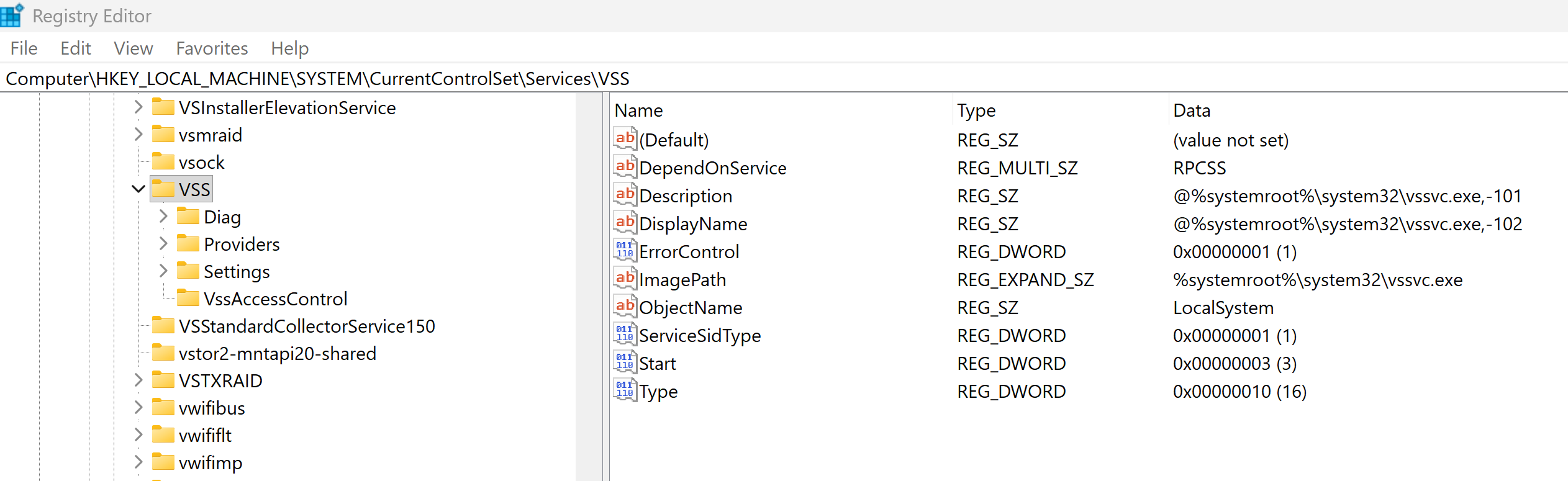
But from the earlier breakdown of VSS components, we know that the VSS service only serves as a coordinator - it is VSS providers that actually perform the work. If we look at the VSS service’s Providers registry key, there will be a single provider with CLSID {65EE1DBA-8FF4-4a58-AC1C-3470EE2F376A}.

Tracking this CLSID through the registry leads us to another service: swprv.


Looking up that service, we see its image path is svchost.exe, which is simply hosting the VSS provider DLL swprv.dll.
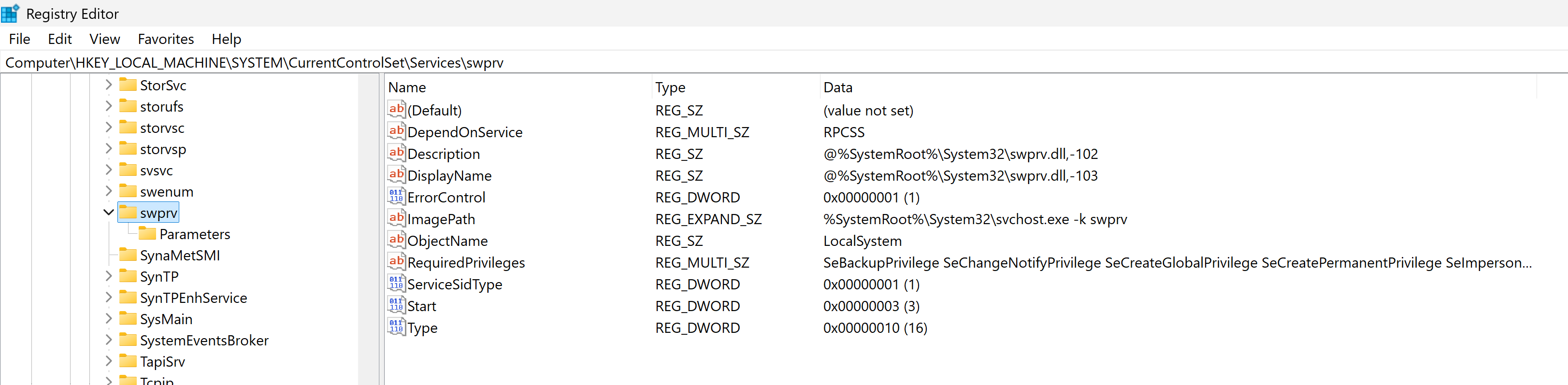
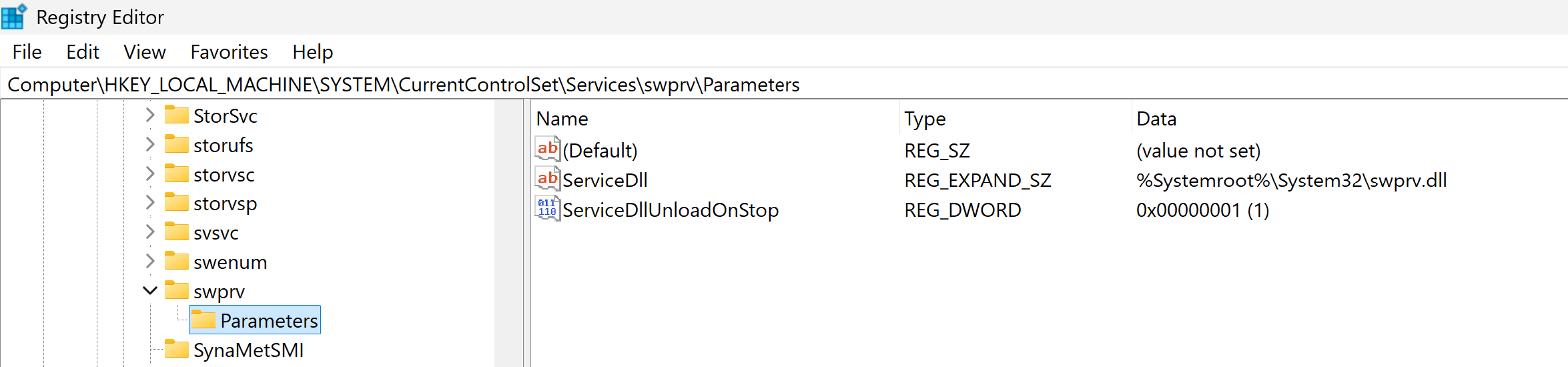
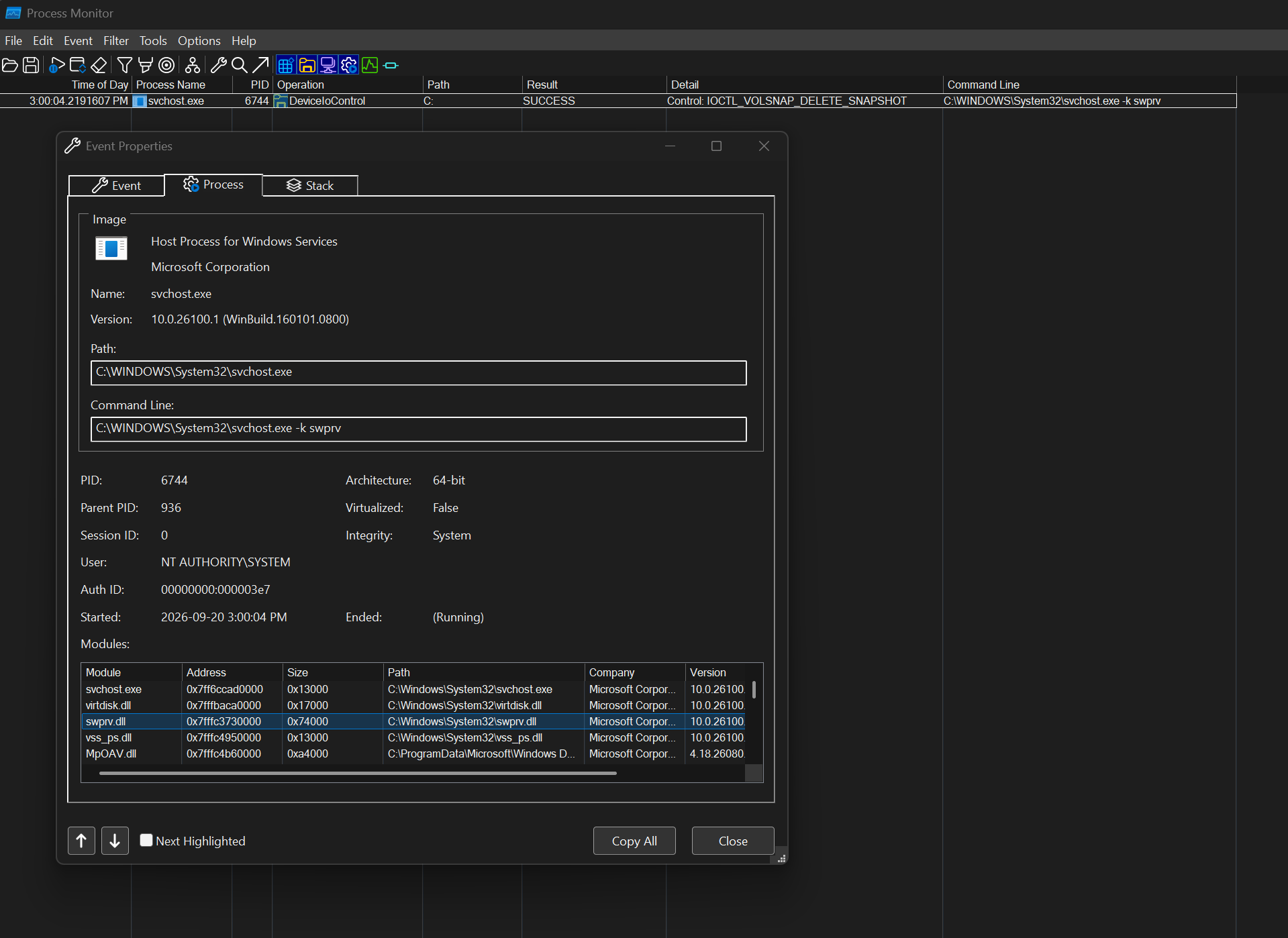
So now we know which process actually performs shadow copy operations on our behalf. Running the PoC alongside Procmon and filtering for the IOCTL to the VSS driver confirms exactly this - the IOCTL_VOLSNAP_DELETE_SNAPSHOT is issued by svchost.exe hosting swprv.dll, not by our PoC process.
Conclusion
But why does this even matter? Outside of the fact that it is very interesting to figure out how COM-based services work - let's think about the detection side.
We already know that the common deletion methods are easy to detect. But when you go through COM, you essentially delegate the shadow copy removal to a legitimate svchost.exe process. Since this is how VSS normally operates on a daily basis, this behavior will most likely be whitelisted and the activity will go undetected.
I would challenge you to pick your favorite EDR product, create two binaries: one that removes volume shadow copies by issuing IOCTL_VOLSNAP_DELETE_SNAPSHOT (0x53c038) directly via DeviceIoControl and the second one that does the same thing via COM interfaces. Run these two one after another and check which one will piss off the EDR product and which one will execute quietly without triggering anything.
So... start monitoring COM interface and methods in your environment before fun things like this start happening in it =)
References
- https://www.fortinet.com/blog/threat-research/stomping-shadow-copies-a-second-look-into-deletion-methods
- https://learn.microsoft.com/en-us/windows/win32/api/vsbackup/nf-vsbackup-ivssbackupcomponents-deletesnapshots
- https://learn.microsoft.com/en-us/windows/win32/api/vsmgmt/nf-vsmgmt-ivsssnapshotmgmt-queryvolumessupportedforsnapshots