Part I: Registry


Summary
In this post, we will take a look at how WMI COM interfaces could be used to modify the Windows registry, and how such an approach could be a pain in the neck to detect.
COM and WMI
Component Object Model (COM) has been part of Windows since 1993, and Windows Management Instrumentation (WMI) was built on top of it in 1998 - so neither of these is new. Both have been in heavy use for decades and are not going anywhere anytime soon. The main advantage of using WMI, and by extension COM, comes down to infrastructure - which behaves the way it does precisely because of how COM works under the hood. If you know a little bit about COM, you can pretty much predict how WMI is going to behave and why.
The Blind Spot
The WMI comes with a bunch of interesting standard providers. We will take a look into several of them across the next few posts, since each one backfires in its own interesting way. But for this one, we will focus specifically on the registry provider.
I've been working in detection engineering for a while now. Once you start building detections, spending a ton of time tuning out noise and even more time digging through EDR source code, you eventually reach the conclusion that every single EDR product out there works pretty much the exact same way. Captain obvious over here =) You have got a bunch of custom kernel drivers generating an absolute shitload of telemetry that needs to be stored somewhere, and you have got more or less the same set of detections - most of which require constant tuning, because nobody wants to stare at a wall of false positives every day.
Take the registry Run key, for example. The most obvious persistence mechanism on the face of the planet, right? Well, if you write a C++ application that establishes persistence via a Run key, that's going to raise a massive red flag in most cases. Duh. It is like in every single MITRE evaluation. Especially when the registry modification is coming from some unknown, unsigned binary with suspicious imports. But - unfortunately or fortunately, depending on your perspective - the Run key is also used for perfectly legitimate purposes by legitimate applications. You don't want that red flag popping up and causing panic every time someone installs Teams and it creates an entry under that key. So in practice, EDR detections almost always have some sort of exclusions. If a Microsoft signed process running in SYSTEM context updates that key, the detection in most cases will typically either exclude such data point or at least it will be assigned with a very low severity and discarded as false positive.
And as it turns out, one way to make Windows processes do "nice" things on your behalf is to go through WMI.
StdRegProv and WmiPrvSe.exe
Now, WMI has a standard registry provider that allows pretty much any registry modification you could need. It is well documented on MSDN, but you don't even need to go there - you can just take a look at the relevant MOF file sitting under C:\Windows\System32\wbem. Specifically, RegEvent.mof. If you open it up in a text editor, you will notice three CLSIDs in there, all pointing to the same C:\Windows\System32\stdprov.dll. The class StdRegProv is implemented in that DLL. The three CLSIDs serve different purposes, but take a look at the HostingModel property. For example, it is set to LocalServiceHost for CLSID {72967901-68EC-11d0-B729-00AA0062CBB7}. That means if this CLSID is used for registry modification, the provider hosting process will be running as NT AUTHORITY\LOCAL SERVICE.
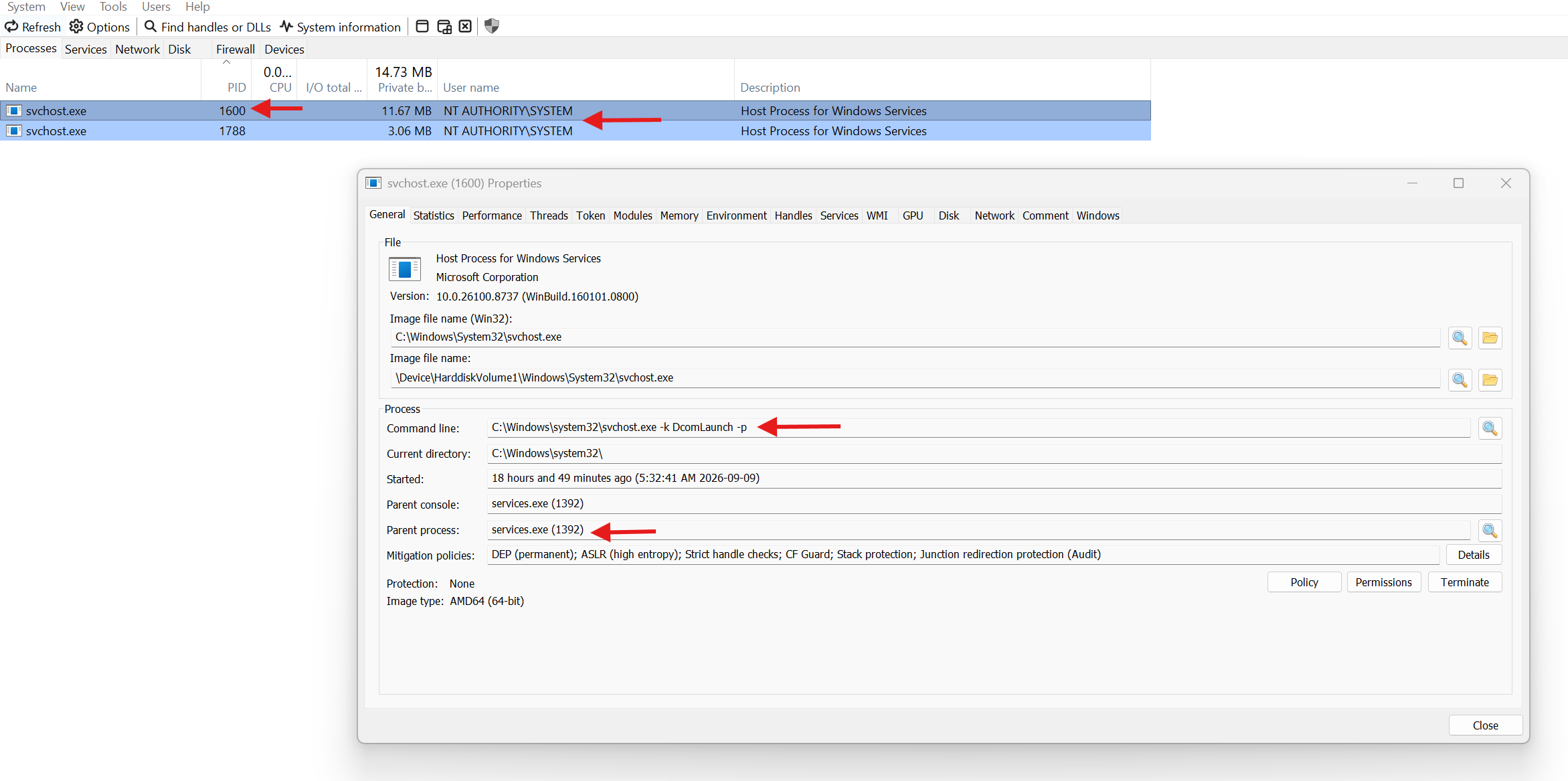
WMI's implementation is very very interesting, but the main thing we care about here is that the WMI service runs inside a shared svchost process executing as Local System. Pop open services.msc and take a look at the Windows Management Instrumentation service - you will see the executable set to C:\WINDOWS\system32\svchost.exe -k netsvcs -p, running as SYSTEM. This is the guy that loads providers into the WmiPrvSe.exe provider hosting process on your behalf, which in turn launches as a child of the DCOM Launcher process (the RPC service, running as C:\WINDOWS\system32\svchost.exe -k DcomLaunch -p).
Putting It Together
Ok, so we have talked about WMI and how it works. We know there is this wonderful registry provider that lets us work with the registry, and we know there is this WmiPrvSe.exe process that can do the job on our behalf instead of us touching the registry directly. But how is this actually done in practice?
Well, thanks to the amazing MSDN documentation, as long as you can read, you just have to follow the instructions. The source code is attached for the full details, but here is the gist.
First, once you get past the regular COM initialization boilerplate - CoInitialize, CoInitializeSecurity, CoCreateInstance, and so on - you need to obtain the IWbemLocator interface. This is your entry point into the WMI world. IWbemLocator has a single method, ConnectServer, which lets you access WMI on either a local or remote host. You use this method to get an IWbemServices interface, which pretty much lets you interact with any WMI provider there is. In this case, we want StdRegProv.
Again, StdRegProv is very well documented. For this specific example, we are interested in the SetStringValue method, which lets us set a Run registry key. The way the routine around calling provider's method works: you first call IWbemServices::GetMethod to retrieve info about the method input parameters. Then you call IWbemClassObject::SpawnInstance to generate an instance for those input parameters. Next, using VARIANTs, you set the required SetStringValue inputs - the registry hive, subkey, value name, and the value itself. Finally, you execute SetStringValue via IWbemServices::ExecMethod. The whole process is very straightforward.
Who Actually Touches The Registry
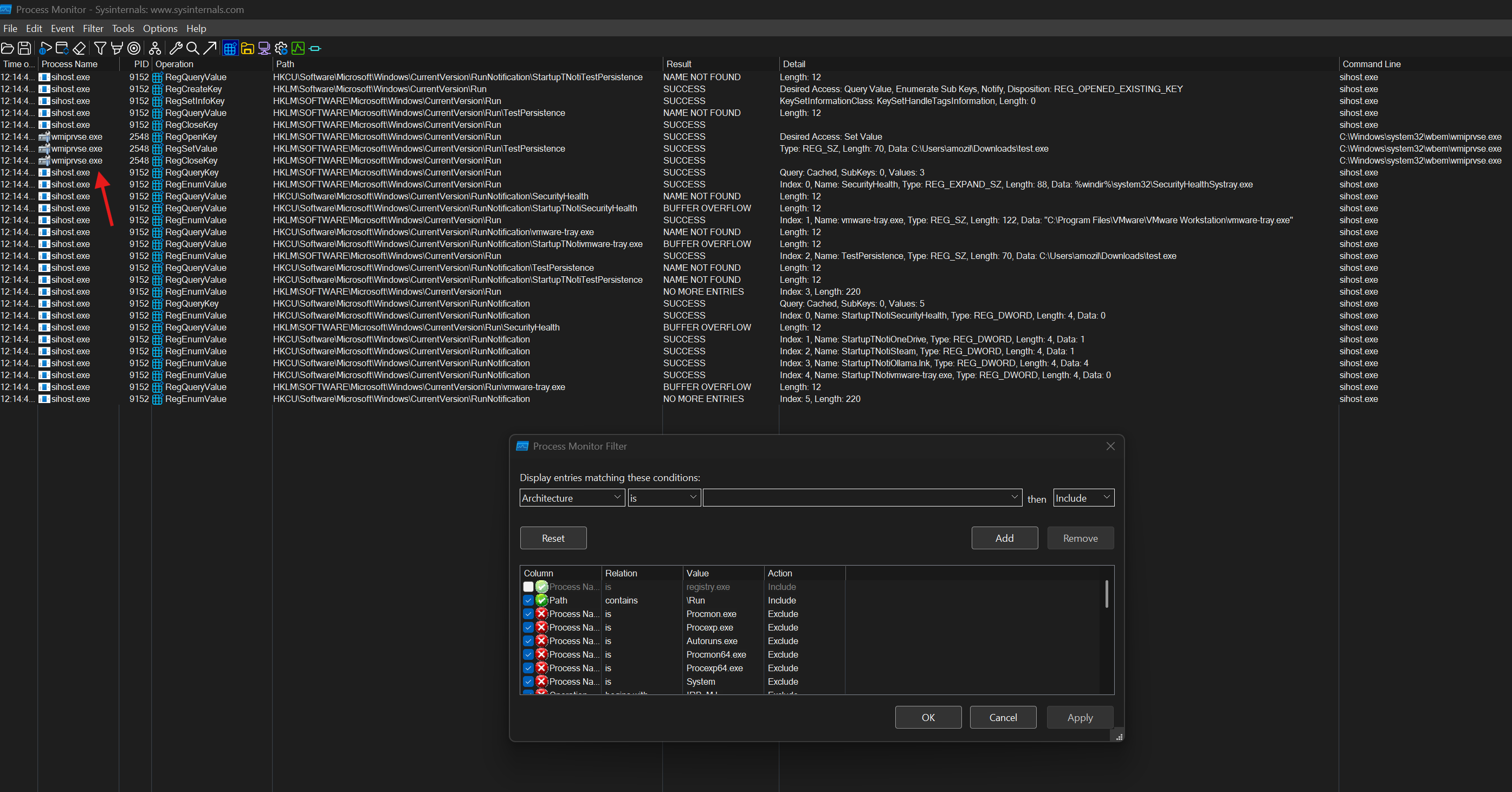
Once you have compiled the executable, kick off Sysinternals Process Monitor and run your binary. As expected, take a look at the execution flow. In my case, the compiled binary is named registry.exe. You can see that registry.exe never touched the registry Run key.
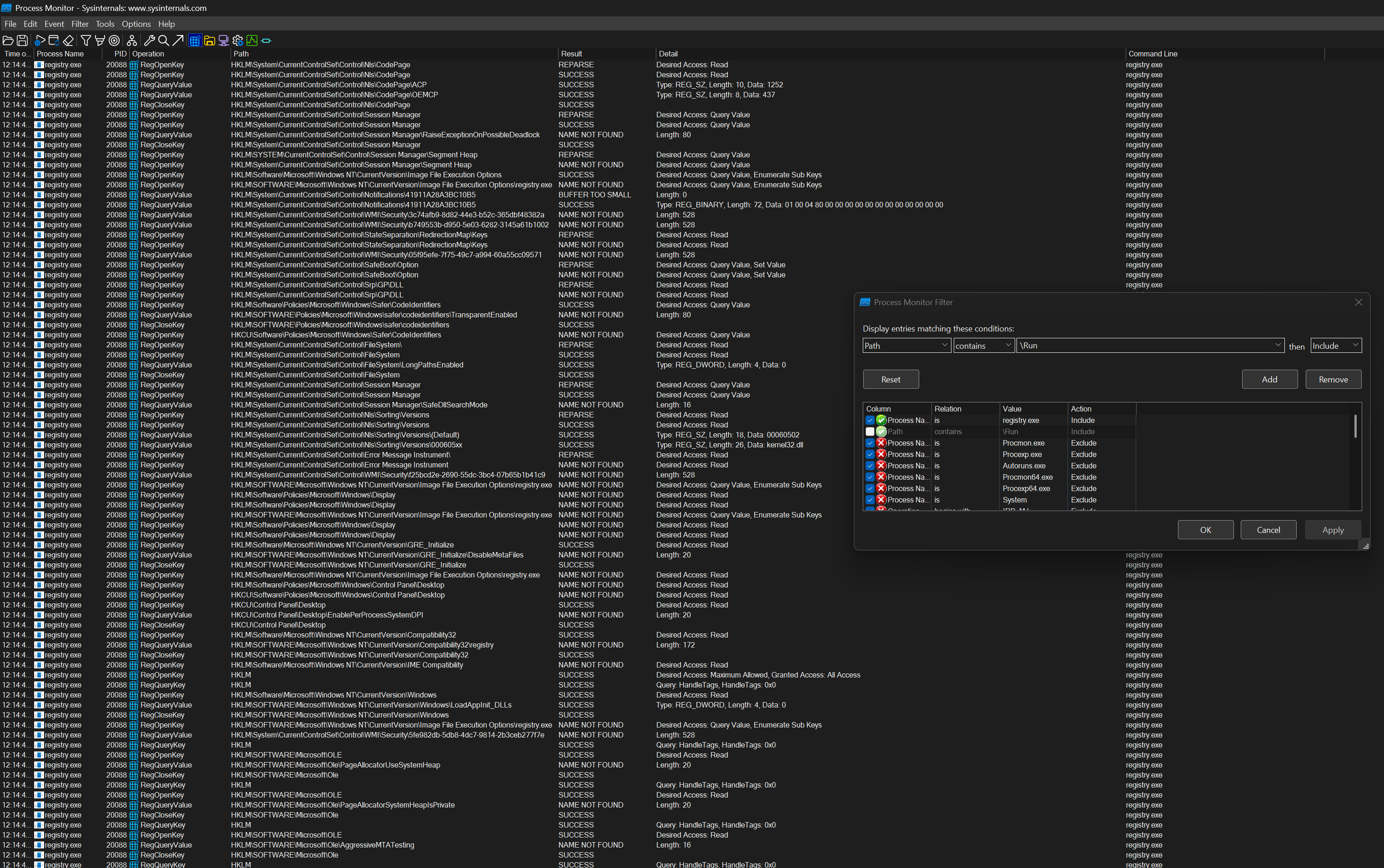

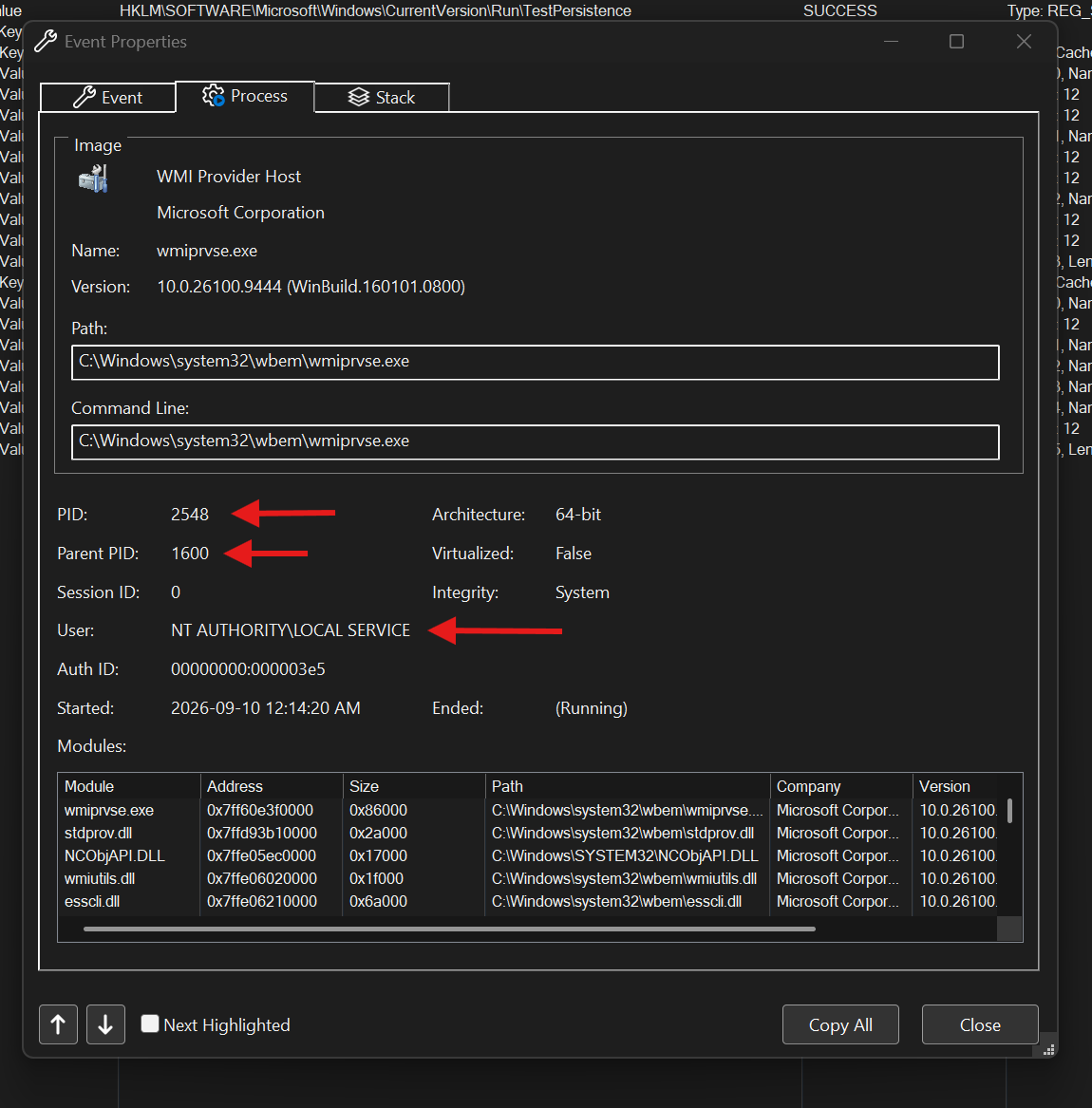
Instead, the provider hosting process WmiPrvSe.exe - executing as NT AUTHORITY\LOCAL SERVICE, launched in turn by RPC service process (svchost.exe) running as NT AUTHORITY\SYSTEM - modified the registry Run key on our behalf. Awesome.
Now, just for the fun of it, pick your favorite EDR product and create two binaries. One updates the registry Run key via standard Win32 APIs - RegSetValueEx and the rest. The other updates the same registry key through WMI COM interfaces. Then check which execution scenario generates an alert and which one sails through undetected. =}
That's It
There's no conclusion here. If an idiot like me can see that this mechanism can be used to bypass EDR, threat actors can certainly see it too. So stay aware and take care. Peace.